
Start new playlists, manage drafts, and control your submissions
The Create tab is where curators build and manage playlists on PlaylistFeed. This is your starting point for curating music, receiving submissions, and getting discovered through Feed and Explore.
What You Can Do in the Create Tab
- Start a New Playlist
- Edit Existing Playlists
- Access Drafts and Unpublished Lists
- Manage Boosted Playlists
This section is only visible to users with curator functionality enabled.
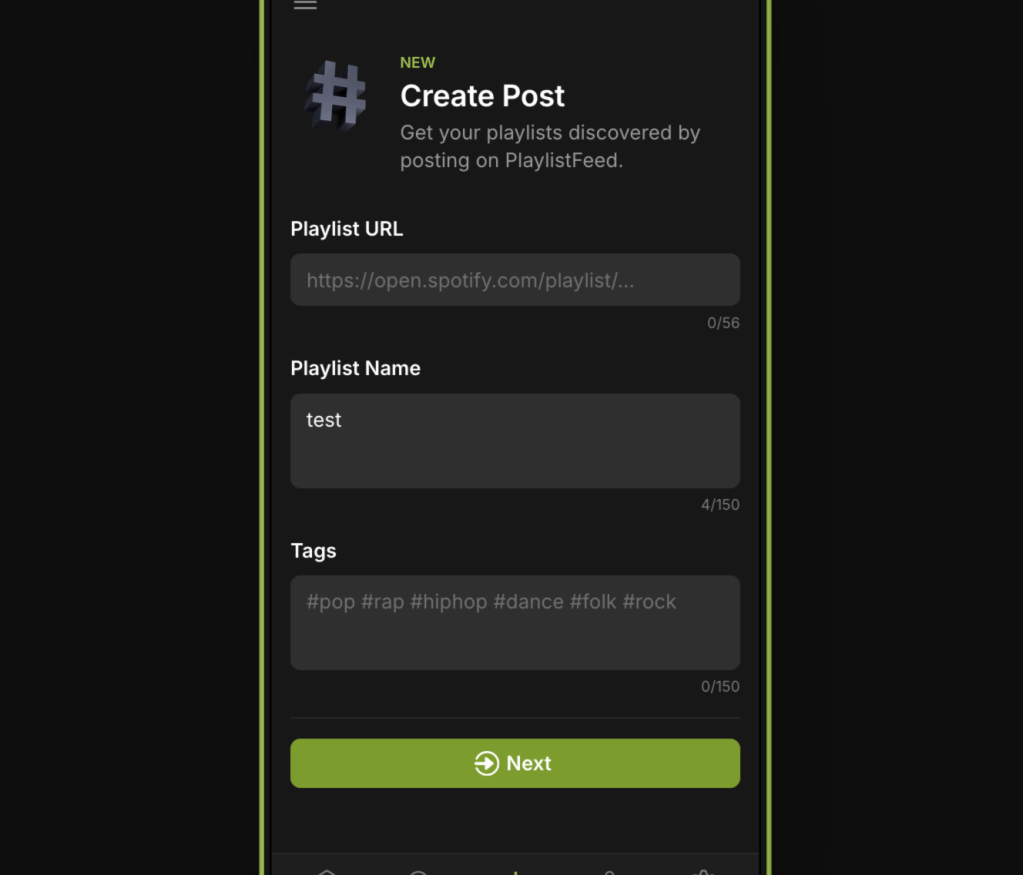
How to Create a Playlist
- Click “+ Create”
- Add required fields:
- Playlist title
- Short caption or description
- Spotify playlist link (must be public)
- At least one genre or mood tag
- Click “Share” to finalize
- (Optional) Click “Boost” to make it visible in Feed, Explore, and Search
Editing and Managing Playlists
- From the Create tab, select any playlist to edit title, tags, caption, or Spotify link
- Boost or unboost playlists as needed
- Delete playlists you no longer wish to manage
- View submission requests and track playlist performance
Notes
- You must Boost a playlist to accept submissions and gain visibility
- Drafts are not visible to other users until published
- You can manage all active and inactive playlists from this tab
 PlaylistFeed Help Center